Author's Guide
Welcome to Lived Places Publishing! We’re proud to publish work that centers lived experience and place. This guide outlines everything you need to prepare and submit your manuscript – from formatting and permissions to referencing, indexing, and accessibility. Our goal is to make the process clear, inclusive, and supportive of your voice.
Overview
Before You Submit
- Contract & Timeline
Confirm your signed author agreement and agreed delivery date. - Permissions
Secure written permission for all third-party content (images, interviews, data, etc.). Submit documentation with your manuscript. - Language & Style
Use inclusive, bias-free language. Choose a consistent form of English (UK, US, etc.) and note it in your submission form. Refer to the LPP House Style for spelling, punctuation, and formatting conventions. - Accessibility
Provide alt text for images, captions for multimedia, and clear descriptions for visual data. This ensures your work is accessible to all readers.
We are always delighted to hear from authors, so feel free to get in touch with your query by using our contact page, or to let us know about issues related to our books or this website email our support team at contact@livedplacespublishing.com.
Manuscript Checklist and House Style
- Submit as a Word document (.docx)
- Double-spaced, 12-point font (e.g., Times New Roman)
- Sentence-style capitalization for headings
- No boxed text
- Use Oxford (serial) commas
- Use spaced en dashes (UK English) or unspaced em dashes (US English) consistently
- Avoid notes where possible; reword into main text
- If essential, use book endnotes (not footnotes or chapter endnotes)
- Number notes consecutively across the book using Arabic numerals
General
You can use whatever form of English you usually use (e.g. UK English, US English, Canadian English, Australian English, etc.) as long as you use that form consistently throughout the whole book (except in quotations, which should be the same as the original). Please also note down the form of English you have used in your manuscript submission form.
Specific
- Use “among”, not “amongst” (also “while” and “amid” rather than “whilst” and “amidst”).
- Don’t use accents on anglicised foreign words like elite, naive, role, etc.
- Avoid gendered writing, so don’t refer to a country or a ship as “she”.
- Avoid using “he/she” – instead use singular “they” or rework the sentence.
- Use “that” for defining clauses and “, which” for non-defining clauses (e.g. “I was in the lecture hall that’s next to the canteen” and “I was in lecture hall B17, which is next to the canteen”).
- Use “a” not “an” in front of words beginning with “h” (e.g. “a historical event”).
- Use “less” when describing an uncountable noun (e.g. “less water”) and “fewer” when describing a countable noun (e.g. “fewer cakes”).
- Please use the Oxford (or serial) comma throughout the book for clarity (except in a quotation which should follow the original). “They like pies, cakes, and cookies.”
- Note that commas can be used before conjunctions (words like “and”, “but”, “if”, “because”) when the clause following the conjunction can be read as a complete sentence on its own (e.g. “I walked to the shops, because I needed to buy some new notebooks” is correct because the underlined text is a complete sentence, but “I walked to the shops, and decided to buy myself cake” is incorrect because the underlined doesn’t make sense on its own, so the comma should be removed). As noted above, please use commas after conjunctions preceding the last item in a list (Oxford or serial comma).
- Be careful when using parenthetical commas when describing someone or something. Often people will write a sentence like this: “The BAFTA Best Supporting Actor-nominated star, Ken Watanabe, moved to Tokyo in 1978.” This sentence is incorrect because it doesn’t make sense if you remove the text within the parenthetical commas (see underlined). It also assumes that he is the only person ever nominated for the BAFTA Best Supporting Actor award. However, the following sentence “My only son, James Smith, is very good at public speaking” is fine because the sentence makes sense once the text within the parenthetical commas is removed (see underlined).
- Use double quote marks and then single quote marks within double for both quotation and scare quotes.
- The report stated that “this comes at a pivotal moment and has been classified ‘top secret’ until further notice”.
- Any punctuation that is not part of the exact quotation should be placed outside of the quotation marks. Here are a variety of correct examples:
- President Kennedy once exclaimed “Ich bin ein Berliner!” (The exclamation mark is within the quotation marks because of the way he said the sentence.)
- Smith believes that “books can change lives”, but Jones disagrees. (The comma is outside the quotation marks because it is a comma we have added – it wasn’t included in the original quote.)
- “Stories are important,” writes Brown, “because they educate and entertain.” (The first comma is within the quotation marks because it was included in Brown’s original quote. If Brown had not included a comma after “important” the comma would have appeared after the closing quotation mark.)
- If you are using brackets, please note that punctuation should not fall immediately before an opening bracket, and the sentence should make sense if the bracketed content is removed.
- We love books (including fiction, non-fiction, and educational) and hope to recommend more this year.
- If you would like to add brackets after a complete sentence, you need to treat the content within the brackets as a complete sentence.
- The report examined the importance of making sure the workplace is an inclusive environment. (We are writing our own report on the related subject of diversity in publishing.)
- If you are using UK English spelling, please use spaced en dashes to set off a parenthetical phrase – as here – but if you are using US English, please use unspaced em dashes—as here—which are longer. (See the numbers and dates section below for how to use dashes in number or date ranges.)
- If listing initials in someone’s name, ensure you punctuate with full stops and spaces:
- Ms S. H. Smith.
- In titles and headings, please just capitalise the first word, any proper nouns, and trade names. “A report notes that Amazon’s business practices are worrying more voters”.
- Subjects (mathematics, history, sociology) should be in lower case unless you are referring to a whole department or a professor of a subject (e.g. “The Department of History”, “Professor of Disability Studies”). The professor is correct but you would then capitalise before a name: Professor Jones. Similarly, the university is correct but you would have Harvard University or the University of Birmingham.
- Here are some specific capitalisation preferences surrounding the governance of countries that you may encounter. If you have a question about the correct capitalisation of a specific word, phrase, or name that does not appear below, please contact your commissioning editor.
- government, parliament, Commons, House, Lords, the Left, left wing., the foreign secretary, the queen, Queen Elizabeth II.
- Congress (or the United States Congress), the Senate, the federal government, House of Representatives, the United States Constitution, the president, President Biden.
- the Government of Canada (Gouvernement du Canada), ministers of the Crown (the Cabinet), the federal civil service, the Canadian Constitution, the Queen’s Privy Council for Canada.
- Australian Government (or Commonwealth Government), the Parliament of Australia, the federal Parliament, the House of Representatives, the Senate, the Constitution of Australia.
- New Zealand Government (Te Kāwantanga o Aotearoa), the House of Representatives, the Cabinet Manual, the Executive Council, the Cabinet.
- Religious places and names: church, the Roman Catholic Church, Protestant, Catholic, Orthodox Judaism, Muslim.
- Events: First World War (not World War I), Second World War (not World War II), Big Bang.
- Directions and places: easterly, eastwards, northwest, western Europe, the North of England, the Midlands, South Africa, southern Africa, the West.
- You can use “1.”, “2.”, “3.” if the list is a sequence of events. For multi-level lists, you can also use “(a)”, “(b)”, “(c)” followed by “(i)”, “(ii)”, “(iii)”.
- Bullet points can be used for lists in which the items are not referred to again.
- If a list of either style (numbers or bullets) is introduced by a colon, the first letter of each list point should be capitalised and each list point should end with a semicolon, apart from the penultimate one, which should end with “; and” and the last one, which should end with a full stop.
Here are the points on this:
- Point 1 text;
- Point 2 text;
- Point 3 text;
- Penultimate point text; and
- Last point text.
Start of next sentence post-list.
- If a list of either style follows on from a complete sentence that ends in a full stop, each point should start with a capital letter and end with a full stop.
- If a list is introduced by a colon and is only one or two words per point, start the point with a lower case letter and end with no punctuation, apart from the last point, which should end will a full stop unless the sentence continues after the points.
Here are the points on this:
- cheese
- cake
- milk
- bread.
Start of next sentence post-list.
Or
When I go shopping I like to buy:
- cheese
- cake
- milk
- bread,
but I would like to try some new things.
- Spell out “for example”, “that is”, and “and so on” in the text but use the abbreviations “e.g.”, “i.e.”, and “etc.” within parentheses.
- Spell out all uncommon abbreviations at their first occurrence and provide the abbreviation in brackets. Thereafter, just use the abbreviation (e.g. “I attended the last Independent Publisher’s Guild (IPG) conference recently. The IPG is known for …”).
- Punctuate truncations (Prof., vol.) but not contractions (Dr, Mr, St, vols). Truncations are where a word has been cut off part way through and contractions are where the first and last letters of the word are given. The point/period used at the end of truncations essentially replace the missing end of the word.
- Do not include points/periods in sets of initials/acronyms, except for initials in personal names (e.g. use “UK” and “US” (instead of “U.K.” and “U.S.”) and “Ms S. H. Smith” (instead of “Ms S H Smith”)).
- Contractions are acceptable in moderation (e.g. “don’t”, “can’t”, “I’ll”).
- Don’t modify contractions used in sources you are quoting.
- Italicise text in foreign languages except for proper nouns and words that are now commonly used in English (e.g. ad hoc, bona fide, cafe, naive, avant-garde, status quo, vice versa). Italicise: a priori, a posteriori, et al., reduction ad absurdum, cogito, Dasein, qua.
- Include translations of foreign words or phrases (including book or article titles) in ordinary brackets in the text and extracts, and in square brackets [ ] in bibliographic references and after displayed extracts.
- Translations of titles are capitalised sentence style (the first letter of the first word is capitalised and any proper nouns).
- Where place names are given, use the English version where appropriate or provide the English alternative in brackets following the original place name.
- Book titles, journal names, operas, collections of poetry and long poems, paintings and plays should all be italicised in the text and the references.
- Exceptions: religious texts (The Bible, the Koran, etc.), song titles.
- Please use bold for emphasis rather than italics, but this should be done only where absolutely necessary.
- Hyphenate compound structures when the hyphen is essential for meaning. There is a difference in meaning between a “deep green sea” and a “deep-green sea”.
- When a compound modifier includes an adverb ending in “-ly”, do not hyphenate it (e.g. “the delicately scented rose” not “the delicately-scented rose”).
- Use a dictionary for prefixes such as anti-, extra-, inter-, over-. Some can be run on, but some require a hyphen. The main thing to consider here is that they should be consistently presented throughout your book.
- Write out numbers to ten and thereafter use the digits (e.g. “three people”, “11 people”). However, avoid mixing in the same sentence – use digits in this case.
- If you are listing page numbers always use the digits.
- Use commas in large numbers (“1,000”).
- Do not elide any number or date ranges (e.g. use “1927–1988” rather than “1927–88”), including in the references and the index.
- Please use an en dash between the numbers/dates rather than a hyphen. If you are using Word, you can find en (and em) dashes in Insert > Symbol > More Symbols > Special Characters.
- When providing a number/date range, if you introduce it with “from”, you should not use an en dash but rather write “This happened from 1967 to 1969” (similarly, “between 1967 and 1969”). If you are introducing it as “in”, you can use an en dash: “This happened in 1067–1969.”
- If you are following UK English spelling, please list dates as “27 May 2021”. If you are following US English spelling, please list dates as “May 27, 2021”.
- 1980s (not 1980’s, ‘80s, eighties, or nineteen eighties) and twentieth century (not 20th century).
- Avoid using superscript when writing numbers (e.g. use “100th” not “100th”).
- Write out per cent rather than using the symbol (e.g. “12 per cent”) except in tables.
- If you are providing a number with units, write the number as digits and provide the standard abbreviation or symbol for the unit of measurement (“6 lbs” rather than “six lbs” or “six pounds”) with a space between the digit and the unit.
- Avoid mixing imperial and metric measurements – please just use one system throughout the whole book.
Images & Figures
- Submit high-resolution image files separately, clearly labeled
- Resolution: At least 300 DPI for print
- File Format: Preferably TIFF or JPG
- Include alt text and captions in a separate document or embedded in the manuscript
- Figures should be left-aligned unless otherwise requested
Writing Alt Text
Alt text (short for “alternative text”) is a brief description of an image that helps readers who use screen readers or cannot view visuals. It’s essential for making your work accessible to all audiences.
What Makes Good Alt Text?
Effective alt text is:
- Concise: Aim for 25–30 words
- Purposeful: Describe what the image conveys in context
- Objective: Focus on facts, not interpretation
- Unique: Don’t repeat the caption or surrounding text
- Clear: Use plain language and spell out numbers
Examples:
| Image Type | Alt Text Example |
| Photograph | “Two students sitting on a bench outside a university building, talking.” |
| Chart | “Bar chart showing a 20% increase in housing costs from 2010 to 2020.” |
| Map | “Map depicting the journey of displaced communities relocating to safer regions.” |
| Artwork | “Abstract painting with swirling blue and orange brushstrokes.” |
Tips for Authors
- Decorative images can be marked as “decorative” so screen readers skip them
- Avoid phrases like “image of” or “graphic showing” – screen readers already announce the format
- For complex visuals, consider adding a longer description in the main text or appendix
Referencing
General Notes
- There’s also a useful guide to the Harvard referencing system online here: citethisforme.com/harvard-referencing, but every guide to Harvard will be slightly different and will vary from this guide. Please use this guide where possible.
- Do not elide the page numbers (use “pp. 24–26” rather than “pp. 24–6”).
- If you have used just one page of a book or article, for example, list as “p. 27”; if you have used a range of pages, list as “pp. 27–30”.
- If there are dates listed in a book title, for example, follow the system of elision used there rather than applying our preferences to it (e.g. if the book title is Why Books are the Best: 1967–9, leave it as it is rather than changing it to Why Books Are the Best: 1967–1969).
- When referring to the examples in this guide, you need to follow the punctuation and spacing exactly as it is given here. If there is no space between two elements, that’s intentional. All the full stops and commas are also intentional, and you will need to follow their placement. If punctuation is part of the referencing system rather than part of a title, ensure it is not in italics.
- Please remove hyperlinks and underlining from URLs.
- Where “www.” is given in a URL, please remove “http://” or “https://”.
- For references (not in-text citations), if no date is given, use “n.d.”.
- “Ibid.” can be used within citations where the citation is exactly the same as the previous citation. “Id.” can be used where the author is the same as in the previous citation but the page number is different. Preferably avoid using “Ibid.” or “Id.” at all, but if you prefer to use them, ensure they are consistently presented throughout your book.
- The most commonly used items have examples in green. The layout of the others is given.
- If you have any queries about this system of referencing, please don’t hesitate to get in touch with your commissioning editor who will be able to help.
When quoting or paraphrasing a source in the text, please provide the surname(s) of the author(s) in brackets, with the year the source was published following after a comma. If you are referring to a specific page or pages, you can provide the page number(s) after the year and a comma.
“Books are a joy” (Smith, 2019).
If the author’s name is given in the text, just provide the date in brackets:
The view that “Books are a joy” is supported by Smith (2019, p. 241).
List the authors’ names in the order in which they appear on the source:
“Books are a joy” (Smith and Jones, 2019).
“Books are a joy” (Smith, Jones and Brown, 2019, pp. 2–4).
Use the first listed author’s name followed by “et al.” and the year of publication:
“Books are a joy” (Smith et al., 2019, pp. 2–4).
Place the author’s surname in the text followed by the date of publication in brackets, followed by the next author and so on:
Grey (2010) and Greene (2019) focus on whether books create joy, whereas Martin (2014) explores how much joy is generated by books.
When clustering multiple sources, you can list them all in the same brackets, divided by semicolons. These should be listed in alphabetical order. This is usually where the sources have the same viewpoint:
“Books are a joy” (Greene, 2019; Grey, 2010).
Use the name of the organisation in place of the author:
“Books are a joy” (The Book Foundation, 2019).
When an author’s name cannot be found, place the title of the text in the brackets, followed by the year of publication.
“Books are a joy” (We Love Books, 2019).
When a date is not included in a source, simply omit that information from the citation:
“Books are a joy” (Smith).
Reference List
For the below, only include the edition number if it is not the first edition. An example of what the reference will look like with the edition number is under the ‘Books with one author’ section only.
When a book is published in a city in the US, please provide the state abbreviation after the city, separated by a comma. E.g. “Notre Dame, IN:”.
Last name, Initial(s). (Year published). Title of Book. Edition number. City published: Publisher.
McAuley, C. A. (2004). Mind of Oliver C. Cox: The African American Intellectual Heritage. Notre Dame, IN: Notre Dame University Press.
If we were referencing the seventh edition of this title, for example, it would look like this:
McAuley, C. A. (2004). Mind of Oliver C. Cox: The African American Intellectual Heritage. 7th ed. Notre Dame, IN: Notre Dame University Press.
Last name, Initial(s). and Last name, Initial(s). (Year published). Title of Book. Edition number. City published: Publisher.
Nicolazzo, Z., Quaye, S. J. and Renn, K. A. (2016). Trans* in College: Transgender Students’ Strategies for Navigating Campus Life and the Institutional Politics of Inclusion. Sterling: Stylus Publishing.
Use “ed.” for single editor, “eds.” for more.
Last name, Initial(s). (Year published). Chapter title. In: Initial(s). Last name, ed., Title of Book, edition number. City published: Publisher, page(s).
Murray, M. C. (2021). Power, disability, and the academic production of knowledge. In: L. Carlson and M. C. Murray, eds., Defining the Boundaries of Disability: Critical Perspectives. Abingdon: Routledge, pp. 2–4.
There is no need to include the edition number if it is the first edition.
Editor surname, Initial(s). ed. (Year). Title. Edition (Place of publication: Publisher).
Carlson, L., and Murray, M. C. eds. (2021). Defining the Boundaries of Disability: Critical Perspectives (Abingdon: Routledge).
Place citations in order by year. When sources are published in the same year, organise alphabetically by title.
Collins, P. H. (2002). Black Feminist Thought: Knowledge, Consciousness, and the Politics of Empowerment. 2nd ed. Abingdon: Routledge.
Collins, P. H. (2006). From Black Power to Hip Hop: Racism, Nationalism, and Feminism. Philadelphia, PA: Temple University Press.
Collins, P. H. (2019). Intersectionality as Critical Social Theory. Durham, NC: Duke University Press.
If there is more than one title by the same author in the same year, organise alphabetically and put “a”, “b”, “c”, etc. after the year.
Note that there is no space between the volume number and the bracketed issue number. Not all journals will have an issue number, so please just provide the information that is available.
Last name, Initial(s). (Year published). Article Title. Journal Name, volume(issue), page(s).
Javadian, G., Dobratz, C., Gupta, A., Gupta, V. and Martin, J. (2020). Qualitative Research in Entrepreneurship Studies: A State-of-Science. The Journal of Entrepreneurship, 29(2), pp. 223–258.
Last name, Initial(s). (Year published). Article Title. Journal Name, [online] volume(issue), page(s). Available at: URL [Accessed Day Mo. Year].
Gaudry, A. and Lorenz, D. (2018). Indigenization as Inclusion, Reconciliation, and Decolonization: Navigating the Different Visions for Indigenizing the Canadian Academy. AlterNative: An International Journal of Indigenous Peoples, 14(3). Available at: https://journals.sagepub.com/doi/full/10.1177/1177180118785382 [Accessed 26 May 2021].
Last name, Initial(s). (Year published). Page title. [Online] Website name. Available at: URL [Accessed Day Mo. Year].
Morgan, K. (2021). Covid: Many female athletes ‘may walk away’ after pandemic. [Online] BBC. Available at: www.bbc.co.uk/news/uk-wales-56979118 [Accessed 27 May 2021].
Websites with no author
Website name. (Year published). Page title. [Online] Available at: URL [Accessed Day Mo. Year].
BBC. (2018). Gender pay gap ‘widens as women get older’. [Online] Available at: www.bbc.co.uk/news/business-42723960 [Accessed 27 May 2021].
Note that the edition, even if it’s the first edition, should always be included.
Last name, Initial(s). (Year published). Title. Edition. [form] City: Publisher, page(s). Available at: URL [Accessed Day Mo. Year].
Hill Collins, P. (2019). Intersectionality as Critical Social Theory. 1. [ebook] Durham, NC: Duke University Press. Available at: www.kobo.com/us/en/ebook/intersectionality-as-critical-social-theory [Accessed 2 Feb. 2020]
As the following are used less often, we have just provided the format to follow. Remember to follow the spacing, punctuation and capitalisation exactly. If you have any questions, don’t hesitate to ask.
Please note that where a forward slash (“/”) is used, it means “or”, so you will have to decide which piece of information to provide. For example, for archival material, you need to provide the name of the university OR the name of the library OR the name of the organization.
Last name, Initial(s). (Year published). Title of the material. [format] Name of the university/library/organization, Collection name/code/number. City.
Last name, Initial(s). (Year published). Post title. [Blog] Blog name. Available at: URL [Accessed Day Mo. Year].
This includes radio or TV.
Series title. (Year published). [Type of Programme] Channel number: Broadcaster.
Last name, Initial(s). (Conference Year). Title of Paper or Proceedings. In: Name or Title of Conference. [Online] City: Publisher of the Proceedings, pages.
Last name, Initial(s). (Conference Year). Title of Paper or Proceedings. In: Name or Title of Conference. City: Publisher of the Proceedings, pages.
Court cases can be quite complicated to reference, but this is the general format to follow.
Case name [Year published] Report abbreviation Volume number (Name or abbreviation of court); First page of court case.
For more information on referencing court cases, please see this website: https://www.bcu.ac.uk/library/services-and-support/referencing/harvard/other-sources
Dictionary entry in print
Last name, Initial(s). (Year published). Entry title. In: Dictionary Title, Edition. City: Publisher, page.
Dictionary entry found online
Last name, Initial(s). (Year published). Entry title. In: Dictionary Title, Edition. City: Publisher, page. Available at: URL [Accessed Day Mo. Year].
Last name, Initial(s). (Year published). Dissertation title. Academic Level of the Author. Name of University, College/Institution.
Film title. (Year published). [Format] Place of origin: Film maker.
Sender’s Last name, Initial(s). (Year published). Subject Line of Email. [email].
Government Agency/Last name, Initial(s). (Year published). Title of Document or Article. City published: Publisher, page(s).
Last name of Interviewer, Initial(s). And Last name of Interviewee, Initial(s). (Year of Interview). Title or Description of Interview.
Music piece or recordings
Performer/Writer’s Last name, Initial(s). (Year published). Recording title. [Medium] City published: Music Label.
Music piece or recording found online
Performer/Writer’s Last name, Initial(s). (Year published). Recording title. [Online] City published: Music Label. Available at: URL [Accessed Day Mo. Year].
Last name, Initial(s). (Year published). Article title. Newspaper, [online] pages. Available at: URL [Accessed Day Mo. Year].
Last name, Initial(s)./Corporate Author (Year published). Title/Description. [format] Available at: URL [Accessed Day Mo. Year].
Last name, Initial(s)./Corporate Author (Year published). Title/Description of Patent. Patent number.
Last name, Initial(s)./Corporate Author (Year published). Episode title. [podcast]. Podcast title. Available at: URL [Accessed Day Mo. Year].
Last name, Initial(s). (Year). Presentation Title.
Printed:
Corporate Author (Year published) Title.
Online:
Corporate Author (Year published) Title. [Online] Day and Month. Available at: URL [Accessed Day Mo. Year].
Last name, Initial(s). (Year published). Article title. In: Encyclopaedia title, Edition. City published: Publisher, page(s).
Last name, Initial(s). (Year published). Article Title. Magazine, (Volume), page(s).
Last name, Initial(s). (Year published). Article Title. Newspaper, page(s).
Title (Year published). City published: Publisher, page(s).
Last name, Initial(s)./Corporate Author (Year published). Title. [Online] City published: Publisher, page(s). Available at: URL [Accessed Day Mo. Year].
Title/Name of Software (Year published). Place/City where software was written: Company or publisher.
Required Book Elements
Please include the following components in your manuscript, in this order:
- You may include a dedication and/or a book epigraph.
- Abstract (approx. 100 words). This is a brief description of what the book is about. You can adapt your marketing copy for this purpose.
- Key words (up to 10). These are the key words that are integral to understanding what the book is about. You can use the key words from your marketing copy here or adapt them.
- If you need to discuss any language use included in the book that is debated in academia or within communities you can do so in a note on the language section.
- Contents list. This should include all of the chapters but not any sub-headings you may have used within chapters. The chapters should be numbered and titled like this: “[Chapter number Chapter title: Chapter subtitle]” (e.g. “Chapter 1 This is the title of the first chapter: This is the subtitle of the first chapter”).
- If your book covers material that readers may find offensive, triggering, traumatic, or otherwise distressing you may wish to consider using a content warning. Here is an example of a book-level content warning:
Content Warning (Example)
This book contains explicit references to, and descriptions of, situations which may cause distress. This includes references to and descriptions of:
- Suicidal thoughts, intentions, and actions
- Psychotic delusions and hallucinations
- Violent assault
- Ableism, discrimination, and micro-aggressions
Every effort has been made to provide more specific content warnings before relevant chapters, but please be aware that references to potentially distressing topics occur frequently and throughout the book.
- Introduction.
- Learning objectives (up to 5). This can be a numbered or bulleted list or in paragraph form – the layout of these is up to you.
Guidance on learning objectives
From Dr Janise Hurtig, collection editor of Education Studies.
- Learning objectives should be “SMART”: Specific; Measurable or observable; Attainable; Results-oriented; Time-focussed.
- Most important is that they are stated in a way that is specific and discernible by the learner, and, if there is one, an instructor.
- Specific is key – it means that they should be written using verbs that identify the kind of learning that is the objective. So often 3 learning domains are identified: cognitive (new knowledge); affective (new feelings, emotions, senses of self); behavioural (new abilities to do something, often thought of as application as well).
- Here is a list of verbs that could replace the phrase “to understand …” or “to know how …” focussing on the cognitive domain” primarily:
- Define, list, name, recall, record.
- Describe, explain, discuss, recognise.
- Apply, use, demonstrate, illustrate, practise.
- Judge, appraise, evaluate, compare, assess.
- Distinguish, analyse, calculate, test, inspect.
- Design, organise, formulate, propose.
- (From the more affective domain) Value, appreciate, sense, feel, come to believe.
- Here are some examples of how you might craft learning objectives, leaving blanks where specifics could be filled in:
- —- can identify key qualities of effective —-.
- —- can recognise the strengths and challenges in their current —- practice.
- —- can explain the value of a collaboration when leading for social change.
- —- can distinguish between the perspectives of —- and —-.
Some examples of successful LOs:
- Identify three practices associated with effective teacher engagement with neurodiverse learners.
- Describe the qualities that constitute genuine and empathic relationship.
- Reflect critically on their ability to engage in compassionate dialogue with their students’ children.
- Critically examine their own beliefs and preconceptions about First Nation people.
- Articulate their insights into how [race, ethnicity, gender, sexual orientation] are socially constructed.
- Compare and contrast the benefits of in-person and online/virtual learning contexts for diverse students.
- The chapters. You may wish to include chapter-specific content warnings. These can be used in addition to, or instead of, a book-level content warning. They should be placed before the start of the relevant chapter, on a fresh page. Suggested wording: This chapter contains references to suicidal ideation and activity. The chapter starts overleaf.
- Recommended projects/assignments/discussion questions (up to 5). You can choose whether to include recommended projects, or assignments, or discussion questions, or a mix of all 3. The layout is up to you, but we would suggest a numbered or bulleted list for clarity. You can name this section based on what you choose to put in it.
- Notes. Any notes you include in the book will be placed in this one section in the book endmatter (we do not use footnotes or chapter endnotes).
- References. This should be a list of all the works (books, articles, etc.) that you cited in the text. See our guide to referencing in this handbook for more information on how to do this.
- Recommended further reading (up to 5). A list of suggested works (of any kind; can include film and audio as well as books and articles) that readers might use to learn more around the subject area.
- Index. See our guide to indexing for more information on what to include.
Indexing Your Manuscript
You will be creating a short index that mainly uses the terms in your abstract and keywords. You will be creating an embedded index, where you “tag” the entries you want to index in your MS. This will create a highly interactive index where the reader will be taken to the exact location of the index entry, rather than nearby.
We advise that you first review your MS and compile a list of terms that you will want to include in the index before you begin tagging. This will help you decide how you will want to structure your index. Please keep this list of terms short and base it largely on the terms in your abstract and keywords.
Indexing a word or phrase
- To use a word or phrase as an index entry, select the text. To enter your own text as an index entry, place the cursor next to the text that you are indexing without selecting any text.
If you are selecting text, please ensure that you are not capturing any following spaces or punctuation.
- Press ALT+SHIFT+X, and the following dialogue box will appear:
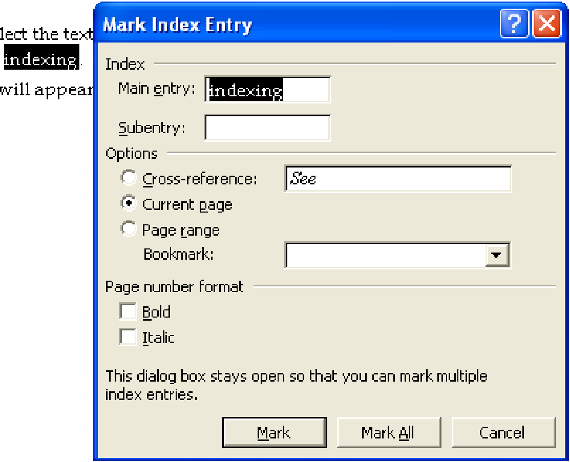
(Here the word “indexing” has been highlighted in the text before pressing ALT+SHIFT+X and appears automatically in the “Main entry” box.)
- Edit the text in the “Main entry” box if necessary (or type in the index heading if you are not using the term directly from the text).
- To create a subentry, type the headword in the “Subentry” box below the “Main entry” box.
- The “Current page” option (centre of the dialogue box) is the default: it simply inserts the page number into the index. If you want to create a cross-reference from the index entry rather than insert a page number, click the “Cross-reference” option and type the cross-reference text into the box:
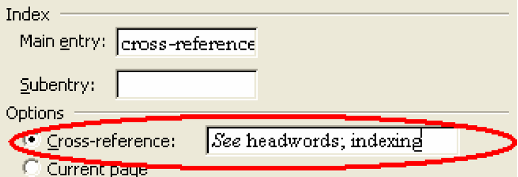
Note that inserting a cross-reference entry does not include a page number reference at the same time. So, if you are including a “see also” cross reference, for example, you will have to mark an additional page entry to ensure that the page number also appears in the index.
- Two checkboxes allow you to specify that the page number for this index entry should be bold or italic (check both boxes for bold italic).

- To mark the entry, click “Mark”. To mark all occurrences of this text in the document, click “Mark All”. Note that the “Mark All” option is available only if you selected text before opening the dialogue box – not if you typed your own text in the dialogue box.
Mark All should be used sparingly and only for very specific, and infrequently occurring terms: note that every occurrence of the phrase you’ve selected will be indexed. This can often lead to long strings of page numbers, often better indexed using the page range option below.
- You can close the indexing dialogue box or leave it open while you work. If you leave it open, you can move around the document and select new words/phrases to index. When you want to insert a new index entry, click on the dialogue box to reactivate it. Any words that you have selected when you click will appear in the Main entry field.
Indexing a whole section of text
The third option in the indexing dialogue box, along with “Cross-reference” and “Current page”, is “Page range”. This is the option that allows you to assign an index entry to continuous text (whether or not it runs over multiple pages).
The process has one step in addition to the process for indexing a word or phrase: you have to begin by giving Word a name for the section of text that you want to index. You do this by creating a bookmark in Word:
- Select the range of text that you want to index.
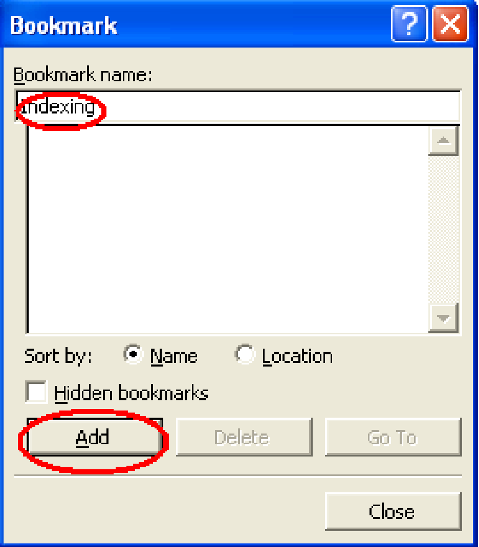
- From the “Insert” menu in Word, select “Bookmark”. The following dialogue box will appear.
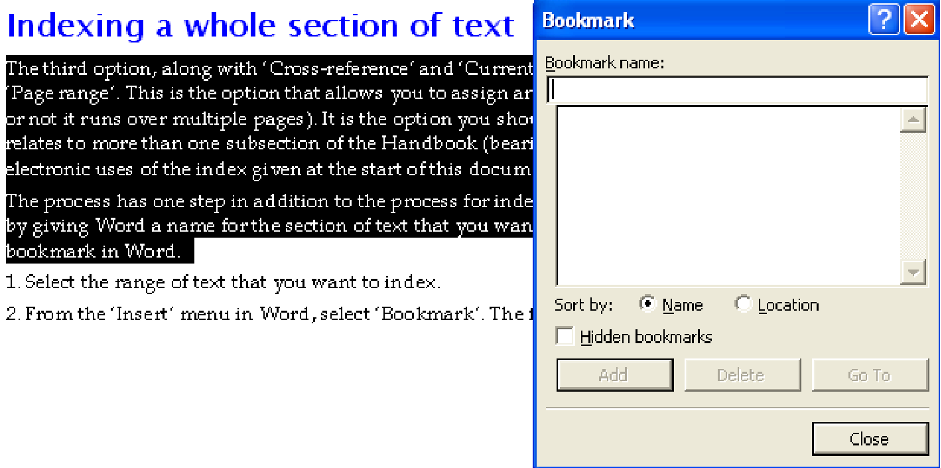
- Type a one-word name for the bookmark in the top line and click “Add” to save it. Each separate page span requires a new bookmark.
- Place your cursor at the end of the bookmarked section.
- Press ALT+SHIFT+X to open the indexing dialogue box and do everything as you would for a standard entry (as in the previous section) including typing the headword, except:
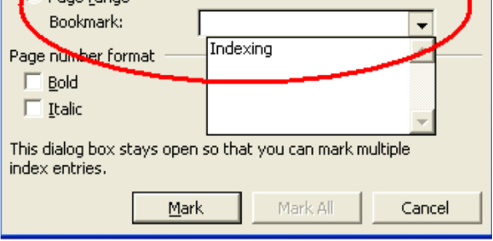
- Click on the “Page range” option and choose the name of the bookmark you’ve just created from the dropdown list immediately below.
We encourage you to review the index regularly as you work through the indexing process. To do so follow these steps:
- Place your cursor at the end of the document before any endnotes inserted using Word’s automatic endnotes feature.
- Choose “Index and Tables” from the “Reference” submenu of the “Insert” menu in Word:

- Press “OK” in the dialogue box that appears.
- This creates an index in Word’s standard layout. There is no need to engage with the options for changing the format of this index (alignment, spacing, etc.) as it will be taken care of during typesetting.
- Word automatically deletes duplicate page entries for the same heading.
- After you have created the index you can continue to work on it. To update the index to take account of changes, place the cursor anywhere within the index and press the F9 key.
- The order in which Word sorts index entries does not take into account the subtleties of alphabetization that have become standard in publishing. It’s important to note that any rearrangements you make to this list will be automatically be undone when the list is refreshed. Once you have finished indexing follow these steps to make edits to the list:
- Generate the final index list following the steps outlined above.
- Copy the list and paste it into a new Word file.
- Switch on “Track Changes” and make any text edits necessary to bring the list up to your expectations. Note that changes should be made to the text parts of the index only. Changes should not be made to the page numbers which are automatically generated. Any alterations to the page numbers will not be shown in the proof.
- Save the file and send that to your project manager along with the main “tagged” Word file.
These corrections will be incorporated during the typesetting stage, which is also the stage when your index tags in the Word files will be coded directly into the typesetting files.
Modifying index entries after you’ve typed them
Word holds index entries directly where they have been placed in the file, as hidden text. To view the entries, you have to unhide the text by clicking the ¶ symbol on the “Standard” or “Home” toolbar in Word.

The index entries are in curly brackets, with the code “XE” at the beginning. A typical entry might look like this: {XE “indexing:in Word”}. Here, “indexing” is the main entry, “in Word” is a subentry. You can edit this text to change the index term.
If you have any queries about the index stage or process, please don’t hesitate to get in touch with your project manager.
An index entry is composed of the main heading and page numbers, subheadings and page numbers, and cross references.
Main headings (use nouns or noun phrases, not adjectives)
- Terms or concepts used throughout the book.
- Names of authors whose work is quoted or discussed at length.
- Names of people mentioned because of their importance in the text.
- Names of relevant countries, regions, and jurisdictions.
- Names of relevant organizations, political parties, and institutions.
Subheadings
- Aspects or explanations of terms, concepts, and actions.
- Subdivisions logically related to the main heading.
General notes
- Endnotes should be indexed only when they contain substantive information that is not found in the text.
- Tables and illustrations should be indexed only if they provide information in addition to what is contained in the text.
- Cross references:
- “see” references are used to assist the reader in finding a subject or name that may appear in the text in more than one form – i.e. Carroll, Lewis see Dodgson, Charles Lutwidge; NATO see North Atlantic Treaty Organization.
- “see also” references are used to direct the reader to topics linked to the topic entry – i.e. bodies, falling see also motion; space; speed; time; velocity; weight.
- Please do not give the subject of the book its own entry. In a book about Jenny Bailey, there should not be the entry “Bailey, Jenny”.
- Only use one level of subheading – subheadings are fine but sub-subheadings should be avoided.
Entry treatment
- Common nouns and noun phrases should be listed lowercase – i.e. economic theory; global warming; philosophy; technology.
- Proper nouns should be capitalised as they are in the text – i.e. Tocqueville, Alexis de; von Neumann, John.
- Use italics for titles of books, songs, ships, legal cases – i.e. Rising Sun (ship); Alice in Wonderland; Brown v. Board of Education.
- The words that make up each entry must correspond exactly with what is in the text in terms of capitalisation, hyphenation, italicisation, etc.
What not to include in the index
- Any material that comes before the table of contents.
- Table of contents.
- Acknowledgements.
- References.
- Chapter titles.
- Verbs or adjectives standing alone – i.e. peripheral; circular; global.
Alphabetical order
Please use letter-by-letter alphabetisation rather than word-by-word. Each entry should be alphabetically ordered up to the first mark of punctuation. Where identical words are included, they should be ordered like this: people, places, subjects/concepts.
Letter-by-letter Word-by-word
publications public health
public health publications
publicity publicity
- Mc and Mac are all treated as Mac and should appear together accordingly. St is treated as Saint for the purposes of alphabetical order.
- “and”, “for”, “of”, etc. should be avoided unless they add meaning to the entry. If such words are unavoidable at the beginning of an entry, ignore them when determining alphabetical order and use the first significant word. It may be possible to include them after the headword(s).
- When indexing abbreviations/acronyms it is preferable to index under the full name with the abbreviation/acronym following in brackets.
- Names should be indexed consistently. For “van de” all occurrences should either be referenced under “van” or under the main part of the surname.
- “The”/“A”/“An”/“La”/“Le”/“Les” as part of a title should appear at the end of an entry, but keep “L’” before adjacent word.
- Subentries should be arranged in alphabetical order.
- Diacritics (accents and pronunciation marks) should be ignored when ordering entries in alphabetical order but ensure that any diacritics used in the text are included in the index.
- When the index is typeset, the subentries will be on a new line. Please only include one level of subentry (sub-sub entries should not be included).
Using Third-Party Content
As an author, it is your responsibility to request and secure copyright permissions for all third-party material used in your manuscript. This would include images, text excerpts, quotations, etc. You may also be required to request permission to reprint your own work previously published by another publisher.
- Copyright is basically the Right to Copy.
- The Copyright owner has the exclusive right to make and distribute copies of their work.
- They also have the right to create adaptations and derivatives of their work.
- Under US Copyright law, this protection lasts for the life of the copyright owner plus 70 years after death (United States).
- All copyright laws are not the same, they vary from country to country.
- Other forms of copyright protection are Trademarks and Patents.
- It is basically requesting permission from the copyright owner to make and distribute copies of their work.
- It’s generally a nonexclusive agreement with very specific terms and conditions.
- Permission does not transfer ownership.
- The copyright holder has no legal obligation to grant anyone permission to use their work.
- There are no set fees.
- There are no set terms and conditions.
- There is no set time for a copyright owner to respond.
Permission is protection from Copyright Infringement Claims.
- Which could range from no cost to between $250 and $30,000 per work.
- In some cases, it can cost a maximum of $150,000 per work.
- Can be reduced to a minimum of $200 per work if the work is not registered with the US Copyright Office.
- A copyright claim can result in court cost and time and stop distribution of your book.
- Fair use is defense, not a right. This means you would have to go to court to prove fair use.
- The term “public domain” refers to works that are no longer protected by intellectual property copyright laws.
- Permission is not required to use these works.
- As of 2019, copyright expires for all works published in the United States before 1924.
Whenever you use a small quotation, summarize information, introduce an idea or fact based on the copyrighted works of other authors.
No, the internet just makes content easily accessible, but that does not mean it is free to use.
There is no specific number of words that you can use without permission or a proper citation. The copyright owner can still claim copyright infringement.
The permissions process is basically the same for all third-party content, but it will vary depending on the copyright holder’s process for requesting the permissions.
False, simply citing or acknowledging the copyright holder is not a substitute for securing permission and does not protect you from copyright infringement.
No, there is no law that requires the copyright holder to respond to any permission requests. A non-response should be considered a denial.
- Determine if permission is needed; when in doubt request permission.
- Identify and research the copyright owner.
- Determine what rights are needed.
- Contact the copyright owner and negotiate terms and/or payment.
- Get your permission agreement in writing.
For professional assistance in securing permissions for your project, contact Charles Morris at SKMLicensing@gmail.com.
Submission Package
Submit the following materials together:
- Final manuscript (.docx)
- Permissions documentation
- Image files and alt text
- Author bio and acknowledgments
- Indexed manuscript and final index list
Marketing & Discoverability
To help readers find and engage with your work, we’ll ask for:
- Keywords and metadata
- Promotional bio and author photo
- Outreach suggestions (networks, conferences, media)